

 >
>
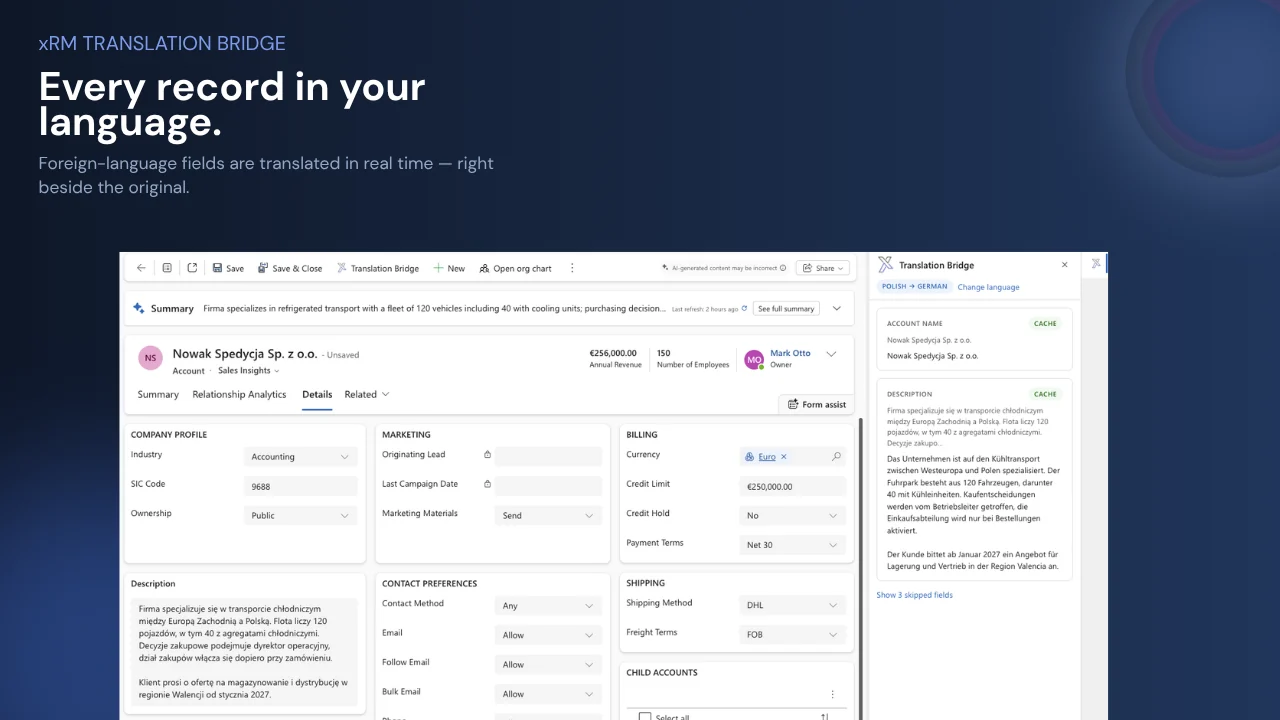
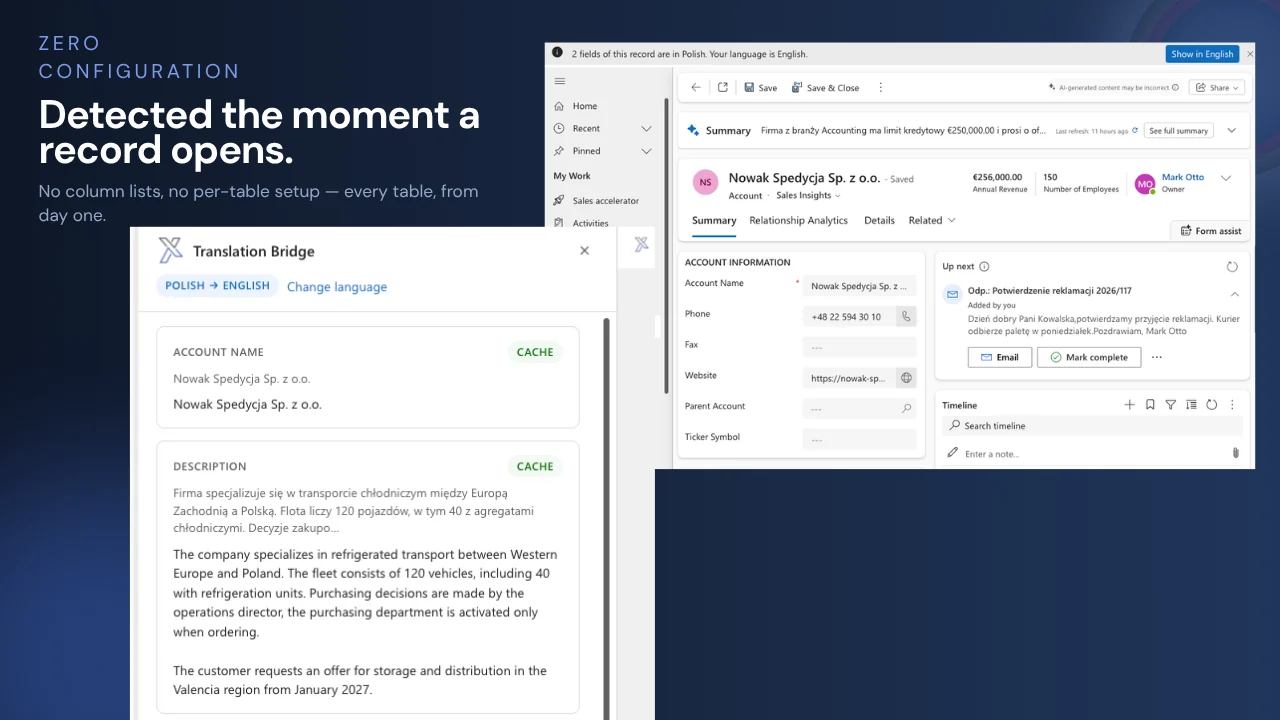
International teams write in their own languages — a Polish account description, a Spanish case, a French opportunity. xRM Translation Bridge detects foreign-language content the moment a record opens and shows the translation in each user's language, side by side with the original. No copy-paste into a browser translator, no per-table setup, no data sent anywhere you haven't chosen.

Now read every record — with xRM Translation Bridge
Less copy-paste. More understanding. Full control inside the system.
xRM Translation Bridge turns foreign-language records from a copy-paste chore into a one-click, in-system read – exactly where your teams work.

Detected automatically, offered in your language


Custom tables and new fields included


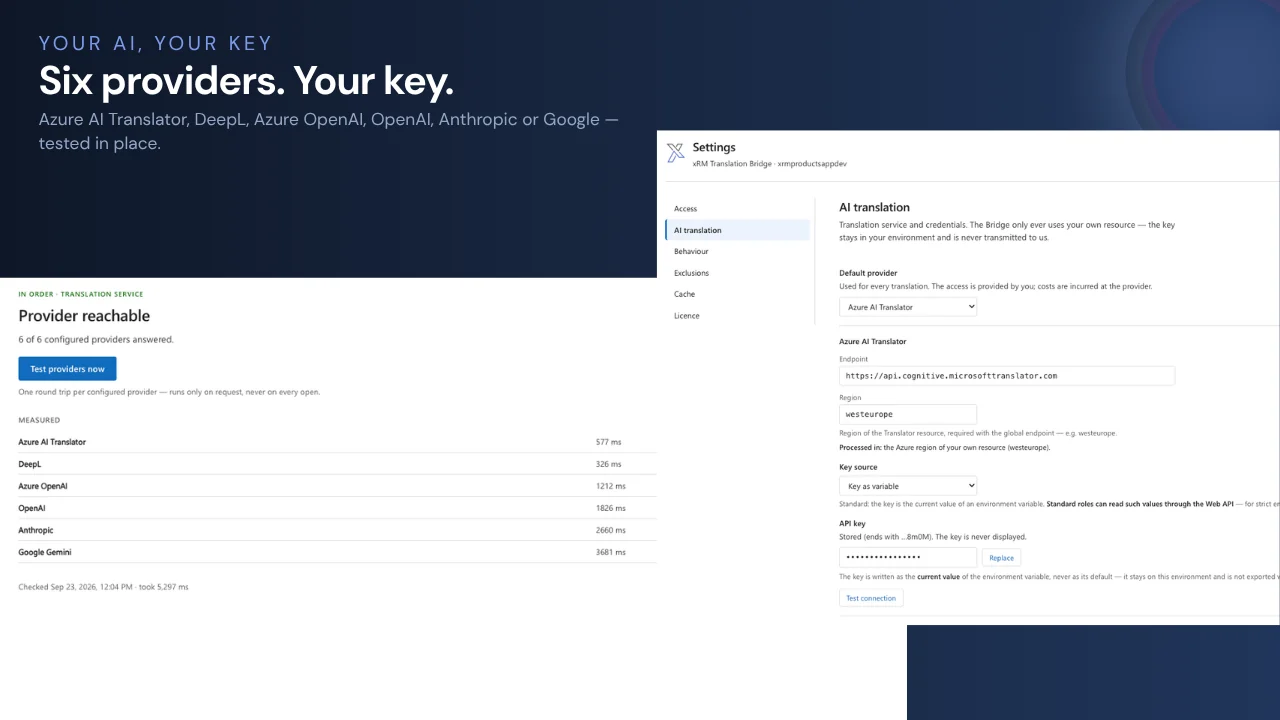
Azure AI Translator, DeepL or Azure OpenAI


Every result a Dataverse row, translated once


Formatting, lists and links preserved


Exclusions, dashboard, insights and system health

Get xRM Translation Bridge — the add-on for Microsoft Dynamics 365 that lets every user read every record in their own language. Real-time translation of field data, cached in Dataverse, powered by your own AI resource — without column configuration or a sales call.



| Capability | Browser translatorcopy-paste · free | Microsoft Dynamics 365built-in · included | Per-entity add-onsAppSource · price on request | xRM Translation BridgeAppSource · $4/user/mo |
|---|---|---|---|---|
| Data translation | ||||
| Field data on standard tables | ◐manual, field by field | —UI labels only | ✓configured columns | ✓ |
| Custom tables | ◐manual | — | ◐after configuration | ✓automatic |
| Fields added after setup | ◐manual | — | ◐re-configuration | ✓automatic |
| Rich text with formatting kept | ◐formatting lost | — | ✓ | ✓ |
| Translation right on the field | — | — | ◐after configuration | ✓one click, no dialog |
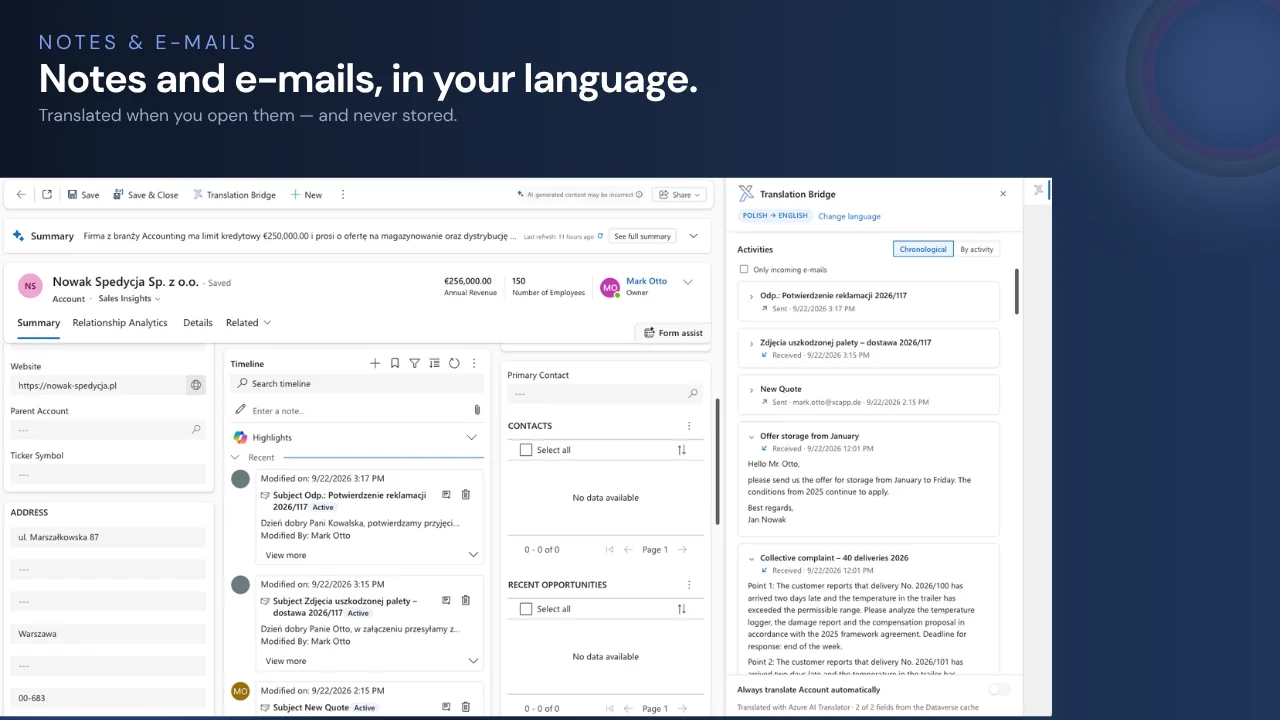
| Notes & e-mails | ◐manual | — | ◐varies | ✓e-mails never stored |
| Automatic language detection | ✓ | — | —user selects | ✓ |
| Translation offered when a record opens | — | — | —on demand | ✓in the user's language |
| Live chat & conversation translation ¹ | — | ✓Customer Service | — | —use Microsoft's native feature |
| AI & data protection | ||||
| Choice of AI provider | ◐whichever website | — | ◐Azure Translator only | ✓six providers |
| Your own key, your own region | —public service | — | ✓own Azure resource | ✓region with Azure & DeepL |
| Admin exclusions for tables & fields | — | — | ◐via column choice | ✓server-enforced, fail-closed |
| Translations kept as Dataverse rows | — | — | — | ✓ |
| Repeated text translated only once | — | — | — | ✓cache across records |
| Workflow & operations | ||||
| Works directly inside Dynamics 365 | —separate browser tab | —no data translation | ✓side pane | ✓side pane |
| No column configuration | —copy every field | — | —per entity | ✓every table, from day one |
| Form load unaffected ² | ✓ | ✓ | ✓on demand | ✓~0.3 s from cache |
| Pricing | ||||
| Public price | ✓free | ✓included | —on request | ✓$4 / user / month |
| Free option | ✓ | ✓included | ◐15-day trial | ✓up to 5 users, no time limit |
| Buy directly on AppSource | n/a | n/a | —contact me | ✓ |
¹ Microsoft translates the user interface and, in Dynamics 365 Customer Service, live conversations — field data such as descriptions, notes or free-text fields is not translated natively. ² The Bridge starts after the form has loaded; measured on Dataverse, pane filled from cache in about 0.3 seconds. Comparison based on publicly available documentation, September 2026.
Translation Bridge turns foreign-language records into something every user can read — inside the record, in their own language. Translations run against the AI resource you configure and are kept as Dataverse rows in your own tenant.
Open any record. The Bridge recognises content written in another language and offers the translation in yours — on every table, including custom tables and fields added after setup. Addresses, e-mail, URL and phone fields and very short values are left as they are.
A side pane shows original and translation field by field. All fields go out in one batched call to the provider you chose — Azure AI Translator, DeepL, Azure OpenAI, OpenAI, Anthropic or Google — with your key. Rich text keeps its formatting; embedded images never leave the record. A notification icon on each foreign-language field shows its translation with one click.
Every translation is stored as a Dataverse row, keyed on the source text rather than the record. The same text on three hundred records is translated once; opening a known record costs no provider call and fills the pane in about 0.3 seconds.
Per user — free for up to 5
Free for teams of up to 5 users — every feature included, no time limit. Above that, the first month is free. Licensing covers the Bridge; provider usage stays on your own subscription, and caching keeps it low.
Wondering how Bridge and Studio fit together? xRM Translation Studio translates your customizations — labels, forms, views, option sets. Bridge translates your data. See the translation comparison →
Field content is sent only to the AI provider you configure, with your own key and under your own agreement with that provider — with Azure AI Translator, Azure OpenAI or DeepL in the region of your resource. No xRM Products service sits in between. Administrators can exclude tables or single fields; exclusions are enforced on the server, and if a check cannot be evaluated, the field stays excluded.
No. All text fields on all tables are covered from the start, including custom tables and fields added later. Administrators define exceptions, never permission lists.
Six: Azure AI Translator, DeepL, Azure OpenAI, OpenAI, Anthropic and Google, each with your own key. You pick the default, see where each provider processes data, and test the connection right in the settings page.
The Bridge is $4 per user per month and free for up to 5 users. Provider costs stay on your own subscription — and because every translation is kept as a Dataverse row, repeated text is translated only once.
No. The Bridge starts after the form has loaded and never blocks it. From the cache, the pane fills in about 0.3 seconds, however many fields the form has.
Yes, once an administrator switches it on. Notes and e-mails related to a record appear in the pane — sorted like the timeline or grouped by type. E-mails are translated only when a user expands them and are never stored; embedded images are never sent to a provider.
Studio translates your customizations — labels, forms, views, option sets — once and permanently. Bridge translates your data in real time. Together they cover both halves of a multilingual CRM.

Welcome to the fascinating world of
xRM Products, get to
know us and our products now!

© 2026 xRM Products LLC