


Testing Rules Safely with Dry Run Mode in xRM Data Guard
Building strong validation rules in xRM Data Guard is crucial to maintaining data quality and compliance in Microsoft Dynamics 365. But before these rules go live, administrators need a way to test them — without affecting real users or production data. That’s exactly what the Dry Run mode is designed for.
What Is Dry Run Mode?
Dry Run mode allows you to execute validation rules in a safe, simulation-based environment. Instead of actively blocking user actions or updating records, the system only logs and reports potential violations. This means you can test every rule as if it were active — but without any operational impact.
It’s the ideal way to fine-tune your configuration, verify logic, and ensure that your operators and values perform exactly as intended before moving them into the production phase.
How Dry Run Mode Works
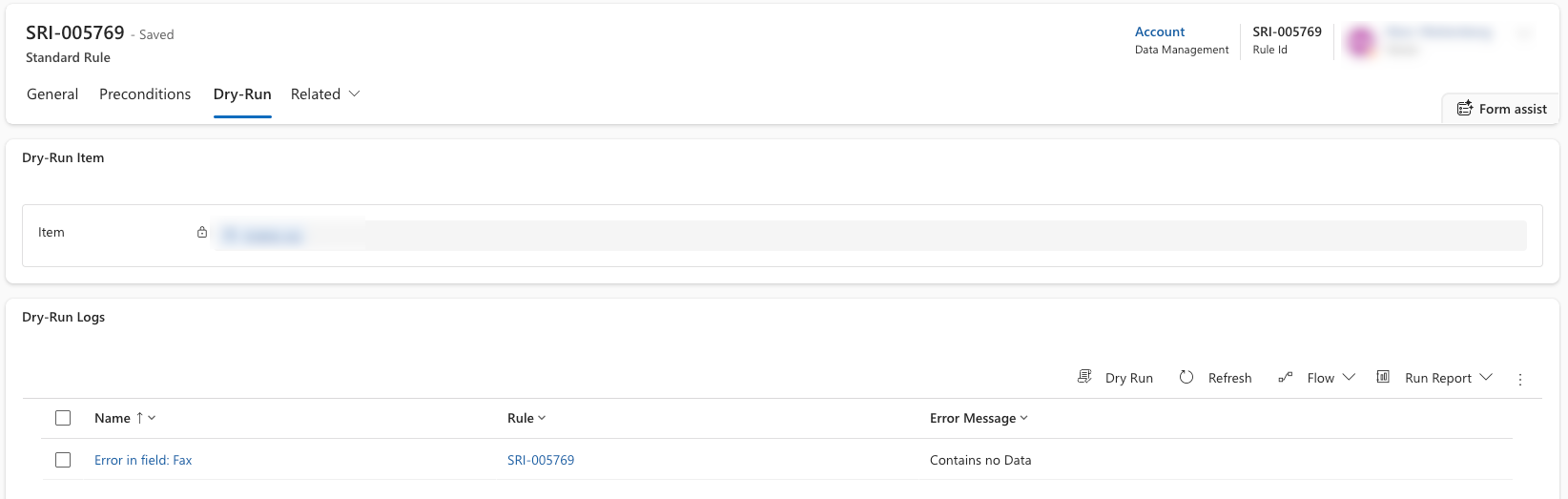
When a rule is set to Dry Run, xRM Data Guard monitors data changes in real time and evaluates them against all active validation conditions. However, instead of preventing the save operation, the system simply records the outcome — including whether the rule would have blocked the record and which fields were affected.
This makes it possible to:
- Preview rule effects before activation
- Collect analytics on how often violations occur
- Identify misconfigured patterns or overly strict conditions
- Ensure that business-critical data remains unaffected during testing
Why It Matters
Testing rules in production environments can be risky — even a small misconfiguration might block legitimate updates or interrupt workflows. The Dry Run mode eliminates this risk by giving administrators full visibility into how each rule behaves under real-world conditions, without changing or restricting data.
Once the results look correct, switching the rule from Dry Run to Approved activates it immediately, ensuring that your data protection strategy moves from simulation to enforcement seamlessly.
A Transparent Way to Test
Each Dry Run execution is logged in detail, including:
- The user who triggered the change
- The entity and field affected
- The evaluated operator and value
- The rule’s expected outcome
These logs are displayed within the xRM Data Guard dashboard, allowing administrators to analyze results and adjust rules directly from the user interface.
From Testing to Production
Dry Run mode acts as your safety net.
It bridges the gap between development and live validation, enabling a smooth transition from testing to enforcement — without disruption or guesswork.
Whether you’re deploying new validation rules or auditing existing ones, Dry Run ensures that every change is transparent, measurable, and fully controlled.
Conclusion
The Dry Run mode in xRM Data Guard empowers administrators to test and optimize validation rules with confidence. It’s a cornerstone feature for every organization that values data integrity and operational safety in Microsoft Dynamics 365.
Want the fundamentals first? Data protection in Dynamics 365 – the overview in our xRM Insights